GMKtec NAS for local AI
Updated
Is GMKtec good for local AI?
Not really. The NucBox G9 is AI Capable at best: an Intel N150 with no NPU, 12GB of soldered LPDDR5 and no way to add a GPU. It will run very small models on the CPU, but its fixed 12GB is the lowest memory ceiling of the N150 mini NAS units we track.
Which GMKtec systems do we track?
1 systems, 0 with a verified UK price. Sorted by AINAS Score.
| System | AI class | Score | Max RAM | Bays | Network | GPU expansion | Price |
|---|---|---|---|---|---|---|---|
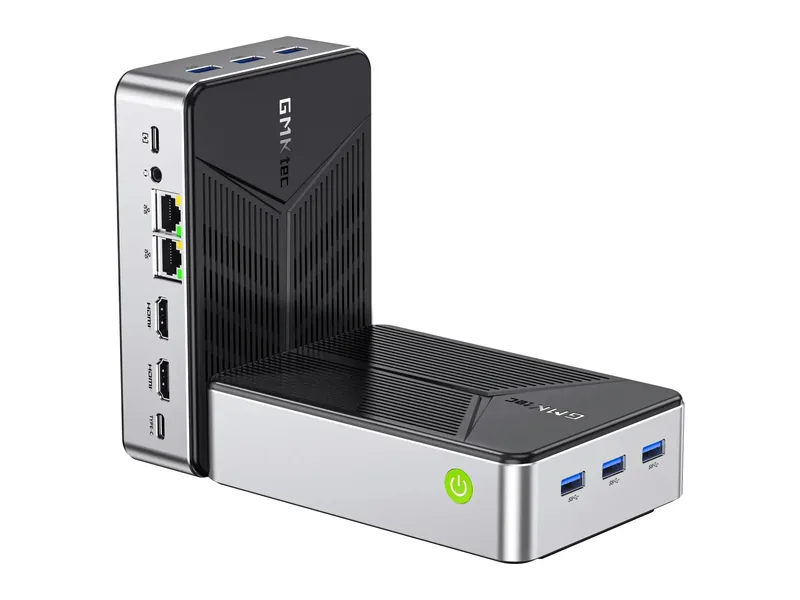 | AI Capable | 28 | 12GB | 0 | 2 x 2.5GbE | None | No verified price |
What AI features do GMKtec systems support?
Local LLM
0 of 1
1 more with limits. 0 documented by GMKtec.
Ollama
1 of 1
0 documented by GMKtec.
Open WebUI
1 of 1
0 documented by GMKtec.
GPU expansion
0 of 1
0 documented by GMKtec.
AI photos
0 of 1
1 more with limits. 0 documented by GMKtec.
Surveillance AI
0 of 1
1 more with limits. 0 documented by GMKtec.
Classes in this range: 1 AI Capable.
What does GMKtec do for local AI?
Only one machine sets the limits here, the NucBox G9, and its silicon offers a local model very little. The four-core Intel N150 has no NPU, so there is no TOPS figure to quote. GMKtec lists Intel UHD Graphics with 24 execution units but makes no claim that they help with AI work, and nothing we hold shows them accelerating a language model. Its product page also shows no PCIe slot, OCuLink or USB4, which closes every route to a discrete or external GPU. That places the G9 in our AI Capable class, with inference falling to those CPU cores.
Memory is the harder ceiling: 12GB of LPDDR5-4800, soldered to the board and without ECC. The amount fitted at the factory is also the maximum, so a model that outgrows it cannot be rescued by an upgrade, and the operating system, any containers and the model itself all draw on that same allocation. That restricts it to small models (Estimated). No larger GMKtec system exists on our list to step up to.
Which GMKtec range fits which buyer?
NucBox G9 is a fit for someone who wants a compact all-flash file server first and treats a private chat model as an experiment. Storage means four M.2 slots with no drive bays at all, so anyone planning a hard disk archive should look elsewhere. Two 2.5GbE ports cover the network side. It arrived in 2025 with a dual-system setup of Windows 11 Pro and Ubuntu, and that choice is what makes it approachable: you can pick whichever system you would rather run Ollama on. A Windows user can take the native installer that Ollama offers on its own download page, while a Linux user can stay on Ubuntu or swap to a NAS OS of their choosing. Docker and virtual machines are both supported, though a virtual machine takes its share of that fixed memory. Open WebUI can run through Docker or Python, although we found no guide written for this platform.
Where GMKtec falls short
The gap that stands out is software. GMKtec supplies no NAS operating system, so file sharing and apps are yours to set up on a general-purpose install. No AI application comes from the vendor either, and there is no AI search, photo, video or surveillance app. Asking questions of your own documents only happens through tools you add yourself, such as Open WebUI. Even the Ollama evidence is general rather than specific: it rests on Ollama's Windows installer, not on a test of this machine. Third-party photo software such as Immich under Docker has not been verified on this hardware, and the same goes for third-party video and surveillance packages. On the hardware side, nothing runs faster than 2.5GbE and the warranty lasts one year.
What GMKtec documents officially
Documentation for local AI is thin, and only two vendor links can be offered because we hold no more than that: the NucBox G9 product page and the machine-readable product data file for the same model. Together they cover hardware such as the processor, graphics, fitted memory, warranty and the absence of GPU ports. We found no GMKtec statement on language models, Ollama, Open WebUI, document retrieval or supported model sizes, and no setup guide for any of them.
How does the NucBox G9 compare?
Against the other N150 boxes we track, memory is the weak point. The Beelink ME mini has 16GB soldered and six M.2 slots. The CWWK X86-P6 Pocket NAS matches the G9 on M.2 slots and network ports but uses DDR5 you can change, in configurations up to 32GB. All of them are AI Capable and lack both an NPU and GPU expansion, so the one with more memory leaves more room for larger models.
What should you know before ordering?
GMKtec's own product page contradicts itself on maximum memory, giving both 12GB and 16GB, and on the power adapter rating. We list 12GB, the amount fitted, because the memory cannot be added to. Its warranty runs one year, so check how GMKtec handles claims before you order. If local AI is the main reason for buying, one of the alternatives above is the better fit.
By our fit rule the 12GB in the GMKtec NucBox G9 runs Llama 3.2 3B at Q4, which needs 11GB, but Llama 3.1 8B and Qwen3 8B at Q4 are only marginal: they need 14GB and 15GB to run well and become marginal from 12GB (all Estimated). That puts the G9 one step below the 16GB N150 boxes on model size, and it is why its stored local LLM score is 25. Its best scores are 30 for business and 28 for home lab use, which come from two 2.5GbE ports and Docker rather than from anything AI related. The AI NAS memory calculator shows how a given model fits in 12GB once the NAS has taken its share.
GMKtec comparisons
Guides for GMKtec owners
See all AI NAS guides.