16GB max RAM · 2 bays · 2.5GbE
AINAS Score 28
No verified UK price
View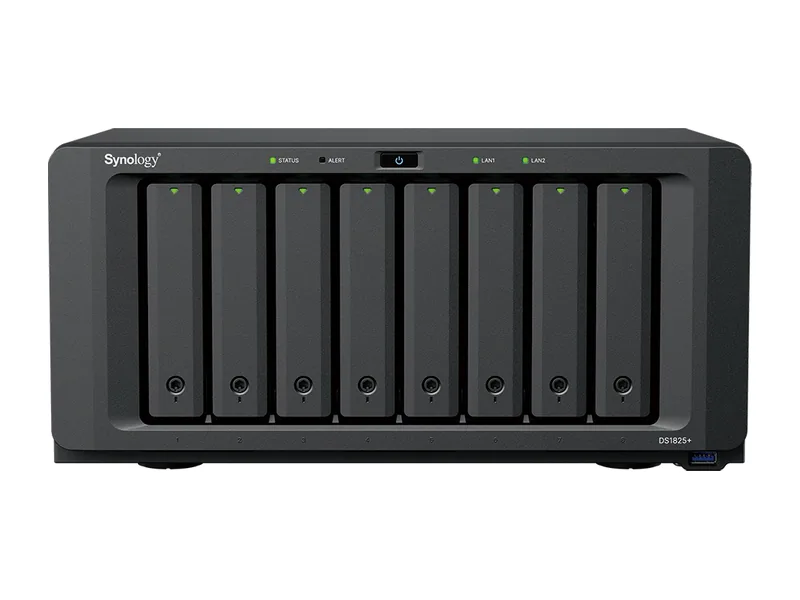
Can the Synology DS1825+ run local AI?
Partly. The Synology DS1825+ runs local models on AMD Ryzen V1500B alone, and its 32GB ceiling allows models up to the 14B class, with 32B class models a tight fit (Estimated), but replies will be slow without graphics acceleration.
No graphics card can be fitted, which keeps every model on the CPU.
Local LLM support is confirmed by community reports.
The DS1825+ is Synology's eight-bay Plus model for 2025, built for storage and backup. For local AI we class it as AI Capable, not AI Ready. Its Ryzen V1500B has four cores, no integrated graphics and no NPU, and Synology lists only network cards for its PCIe slot, so there is no supported route to a GPU.
Ollama and Open WebUI are not Synology packages, but community guides show both running in Container Manager on this CPU. Expect small models, about 1B to 3B, at usable speed, and 7B models slowly. Upgrade from the 8GB it ships with if you want to try. Synology's AI Console connects to cloud models or a self-hosted endpoint elsewhere on your network, which is often the better plan.
Where it shines is data protection: ECC memory up to 32GB, eight bays, two expansion ports for up to 18 drives and the option of 10GbE or 25GbE through the PCIe slot. Pair it with a separate AI machine if local models matter.
Amazon UK
DS1825+ 8GB ECC
£1,446
Verified
In stock
View dealProduct prices and availability are accurate as of the date/time indicated and are subject to change. Any price and availability information displayed on Amazon.co.uk at the time of purchase will apply to the purchase of this product.
Each capability shows how it was confirmed: Verified by AINAS, Vendor confirmed, Community confirmed or Unverified.
| Capability | Supported | Evidence | Note |
|---|---|---|---|
| Local LLM | Limited | Community confirmed | CPU-only Ollama via Container Manager; guides show small models (about 1B to 3B, 7B quantised slowly) on V1500B units. Needs RAM upgrade beyond base. |
| Ollama | Yes | Community confirmed | Not in Package Center; ollama/ollama container runs in Container Manager on DSM (CPU only). |
| Open WebUI | Yes | Community confirmed | Open WebUI container documented on Synology DSM pointing at Ollama on port 11434. |
| RAG | Limited | Unverified | No Synology local RAG for this model; Open WebUI document chat plausible via Docker but not verified on this unit. AI Console only bridges to cloud or OpenAI-compatible APIs. |
| AI search | No | Vendor confirmed | Synology AI Search in Drive uses GPU-powered embedding/OCR models only on supported systems with a GPU (FS/26-series list); this model is not listed. |
| GPU expansion | No | Vendor confirmed | PCIe Gen3 x8 (x4 link) slot exists but Synology lists only 10/25GbE NICs as compatible; no GPU support documented. |
| Hardware acceleration | No | Community confirmed | Ryzen V1500B has no integrated GPU and no NPU; no hardware transcoding or AI acceleration. |
| AI photos | Yes | Vendor confirmed | Synology Photos facial recognition and object recognition listed in product spec (on-device, CPU). |
| AI video | Limited | Community confirmed | No on-NAS deep video analytics (DVA models only); Surveillance Station can use edge AI from Synology BC500/TC500 cameras. |
| Surveillance AI | Yes | Vendor confirmed | Surveillance Station supported, up to 40 IP cameras (1080p H.264); 2 free licences, more require purchase. |
Out of the box the DS1825+ has 8GB; the official ceiling is 32GB of DDR4 ECC SODIMM with ECC support. A memory upgrade is the cheapest way to make it more useful for AI.
Working backwards from 32GB: reserve about 8GB for the operating system and storage services, and at roughly 0.6GB per billion parameters at 4-bit, the largest model that fits is around 40B (Estimated).
ECC support protects against silent memory errors on a box that runs around the clock.
There is no supported way to add a GPU to the DS1825+: no PCIe slot and no OCuLink. Inference runs on the CPU, so keep to small models.
For a personal library, yes. A compact embedding model and a small chat model will run, but the DS1825+ is better as the document store behind a RAG system whose model runs on stronger hardware.
Built-in networking: 2 x 2.5GbE. Adequate for a household, slower for bulk indexing.
| Configuration | RAM | SSD | Notes |
|---|---|---|---|
| DS1825neo+ 4GB non-ECC | 4GB | None | Variant on same spec page with 4 GB DDR4 non-ECC SODIMM; otherwise same hardware |
| DS1825+ 8GB ECC | 8GB | None | 8 GB DDR4 ECC SODIMM (1x 8 GB), 2 slots, max 32 GB |
The closest Synology model by AINAS Score. Only the specifications that differ are listed.
Its strongest AINAS profiles are Home Lab at 41 and Business at 38, which points to home lab owners who want one box for storage, containers, media and a few AI services.
Look elsewhere if you are buyers who expect to add a graphics card later, or teams moving large files over the network every day.
Other AI Capable systems closest in price.
Yes. Ollama support is confirmed by community reports. See the capability table above for the source.
Yes. Open WebUI support is confirmed by community reports. See the capability table above for the source.
Yes. AI photos support is documented by the manufacturer. See the capability table above for the source.
Yes. Surveillance AI support is documented by the manufacturer. See the capability table above for the source.
No. Hardware acceleration support is confirmed by community reports. See the capability table above for the source.
It has 2 x 2.5GbE built in, and the 1x PCIe Gen3 x8 slot (x4 link); Synology-listed NICs: E10G30-T1/E10G30-T2/E10G30-F2 (10GbE), E25G30-F2 (25GbE) can take a faster network card. The fastest port is 2 x 2.5GbE.
Every field records its source. Specifications were last checked on . Spot an error? Send a correction with a manufacturer link.