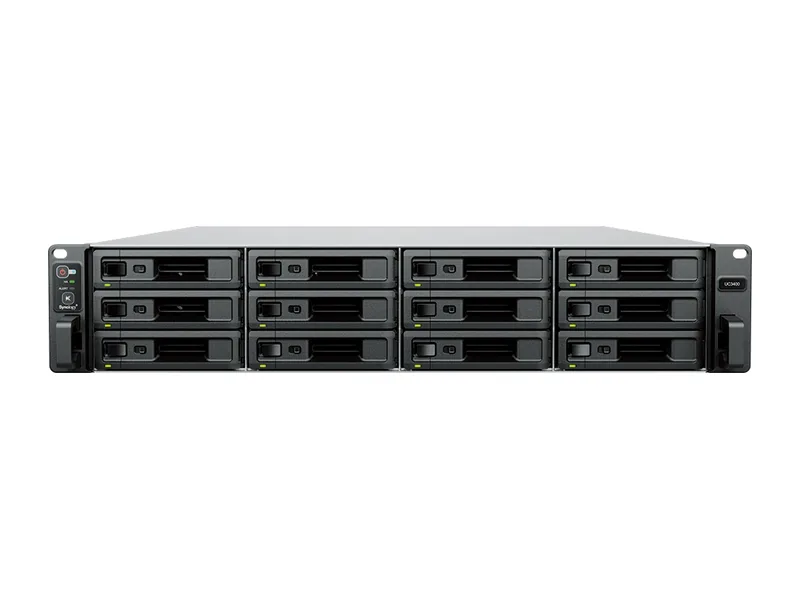
64GB max RAM · 8 bays · 4 x 10GbE
AINAS Score 35
No verified price
Traditional NASOWC
Why Traditional NAS: Single Intel Xeon Scalable (model unpublished) with no documented GPU path and 128GB of memory, but OWC documents no Docker or container support, so the no Docker rule makes it traditional.
Updated
Can the OWC Jellyfish Nomad run local AI?
No. The OWC Jellyfish Nomad is a storage-first Traditional NAS: Intel Xeon Scalable (model not published) and at most 128GB of memory leave no room for a local language model.
It is here as a reference point against systems that can run AI.
The Jellyfish Nomad suits video teams that want a compact, all-flash shared storage appliance with fast wired networking. It has 6 x 10GbE ports, 2 user-swappable NVMe shuttles and 128GB of DDR4 ECC memory. Configurations of 16TB, 32TB and 64TB are listed. It is managed through Jellyfish Manager, a closed appliance OS. A 350W power supply sits in a compact desktop chassis. It is a storage appliance first, and its AINAS Score of 34 reflects that it is not built for local AI work. Buy it for editing storage, not for running models.
The Nomad cannot run local AI. No Docker or container support is documented, no GPU path is documented, and there is no NPU. The 128GB of memory could hold a model, but nothing on the system can run one. This rules it out for anyone who wants local LLMs, private RAG or AI search on their storage. Those buyers should look for a system with Docker or container support, a GPU expansion path such as a PCIe slot or OCuLink, and enough memory for the models they plan to load. An NPU is a useful extra. Its CPU model and core count are not published either.
No verified price
We have not verified a listing for the OWC Jellyfish Nomad at a retailer we track. The specifications below stand on their own; a price appears here as soon as a listing is confirmed.
Product prices and availability are accurate as of the date/time indicated and are subject to change. Any price and availability information displayed on Amazon.co.uk or Amazon.com, as applicable, at the time of purchase will apply to the purchase of this product.
Each capability shows how it was confirmed: Verified by AINAS, Vendor confirmed, Community confirmed or Unverified.
| Capability | Supported | Evidence | Note |
|---|---|---|---|
| Local LLM | No | Unverified | No Docker, container or LLM support documented by OWC; closed video storage appliance. |
| Ollama | No | Unverified | No evidence found. |
| Open WebUI | No | Unverified | No evidence found. |
| RAG | No | Unverified | No evidence found. |
| AI search | No | Unverified | No AI search feature documented. |
| GPU expansion | No | Unverified | No GPU path documented. |
| Hardware acceleration | No | Unverified | No GPU or accelerator documented. |
| AI photos | No | Unverified | No feature documented. |
| AI video | No | Unverified | No AI video feature documented. |
| Surveillance AI | No | Unverified | No feature documented. |
Calculated from the Jellyfish Nomad's memory and each model's published size at each quantization. Rows marked Estimated are calculations, not benchmarks. Check any model.
| Model | Best quantization | Runs? | Memory needed | Expected performance | Verification |
|---|---|---|---|---|---|
| Llama 3.2 3BLlama, 3.21B | Q8 | Yes | 13GB | Not measured | Estimated |
| Llama 3.1 8BLlama, 8.03B | Q8 | Yes | 19GB | Not measured | Estimated |
| Qwen3 8BQwen, 8.19B | Q8 | Yes | 19GB | Not measured | Estimated |
| Gemma 3 12BGemma, 11.8B | Q8 | Yes | 24GB | Not measured | Estimated |
| Qwen3 14BQwen, 14.8B | Q8 | Yes | 28GB | Not measured | Estimated |
| Phi-4 14BPhi, 14.7B | Q8 | Yes | 28GB | Not measured | Estimated |
| Mistral Small 3 24BMistral, 23.6B | Q8 | Yes | 38GB | Not measured | Estimated |
| Gemma 3 27BGemma, 27B | Q8 | Yes | 44GB | Not measured | Estimated |
| Qwen3 30B A3BQwen, 30.5B | Q8 | Yes | 47GB | Not measured | Estimated |
| Qwen3 32BQwen, 32.8B | Q8 | Yes | 50GB | Not measured | Estimated |
| DeepSeek-R1 32B (Qwen distill)DeepSeek, 32.8B | Q8 | Yes | 50GB | Not measured | Estimated |
| Llama 3.3 70BLlama, 70.6B | Q8 | Yes | 98GB | Not measured | Estimated |
| Llama 4 Scout 17Bx16ELlama, 109B | Q4 | Yes | 89GB | Not measured | Estimated |
| Qwen2.5 72BQwen, 72.7B | Q8 | Yes | 101GB | Not measured | Estimated |
| Mistral Large 2 123BMistral, 123B | Q5 | Yes | 112GB | Not measured | Estimated |
One verdict per workload, from the Jellyfish Nomad's use-case scores and capability rows. Unknown means we cannot confirm it, not that it probably works.
The Nomad is a poor choice for local LLMs. Local LLM support is marked no and Unverified, with no Docker, container or LLM support documented, so its 128GB of memory could hold a model but nothing could run it.
Private RAG is a poor fit on the Nomad. RAG, Open WebUI and Ollama are all marked no and Unverified, with no evidence found, and the closed Jellyfish Manager appliance OS offers no documented way to host them.
AI search is a poor fit here. The capability row is marked no and Unverified, and the notes say no AI search feature is documented for the Nomad.
AI photo features are a poor fit on the Nomad. The capability row is marked no and Unverified, with no feature documented, and there is no NPU or GPU to support one.
Surveillance is a poor fit for the Nomad. The capability row is marked no and Unverified with no feature documented, and the system is described as a closed video storage appliance.
We cannot confirm the Nomad for home lab use. Docker and virtual machine support are both unconfirmed, and the appliance OS name is not published, so there is no basis for a match.
The Nomad is OK for business use as shared storage. It has ECC memory and 6 x 10GbE ports, though it has no AI capability, so it suits storage duties only.
Creative AI is a poor fit on the Nomad. GPU expansion and hardware acceleration are marked no and Unverified, with no GPU path or accelerator documented, and local LLM support is also marked no.
The Jellyfish Nomad supports up to 128GB of DDR4 ECC with ECC.
Working backwards from 128GB: reserve about 8GB for the operating system and storage services, and at roughly 0.6GB per billion parameters at 4-bit, the largest model that fits is around 200B (Estimated).
ECC support protects against silent memory errors on a box that runs around the clock.
There is no supported way to add a GPU to the Jellyfish Nomad: no PCIe slot and no OCuLink. Inference runs on the CPU, so keep to small models.
Not well. A useful private RAG setup needs more memory or compute than the Jellyfish Nomad offers.
Built-in networking: 6 x 10GbE. Plenty for a shared knowledge base with several users.
| Configuration | RAM | SSD | Notes |
|---|---|---|---|
| 16TB, 128GB | 128GB | 16TB | |
| 32TB, 128GB | 128GB | 32TB | |
| 64TB, 128GB | 128GB | 64TB |
The closest OWC model by bay count and AINAS Score. Only the specifications that differ are listed.
Its strongest AINAS profiles are Business at 45 and Home Lab at 43, which points to small offices that need shared storage with private AI tools and room to grow.
Look elsewhere if you are buyers who expect to add a graphics card later, or anyone who needs a lot of raw storage.
Other Traditional NAS systems closest in overall score.
No. Memory would hold the model, but nothing on the Nomad can run it. The Nomad has 128GB of memory, and Mistral Large 2 123B needs 73GB at Q4 (Estimated). No Docker, container or LLM support is documented, so the system is a closed video storage appliance and cannot run model software.
Yes. The Nomad uses 128GB of DDR4 ECC memory. The memory type comes from a manufacturer source read through a search extract, so confidence in that detail is low. Maximum memory is also 128GB, so no larger option is documented.
Six. The Nomad has 6 x 10GbE ports, direct attached, according to the OWC release. There is no 2.5GbE, 5GbE or 25GbE port listed. A dual 25GbE NIC was previewed, but it is not recorded as part of any configuration.
No. It has 0 SATA bays and uses 2 user-swappable NVMe shuttles instead. Configurations of 16TB, 32TB and 64TB are listed, each with 128GB of memory. It is an all-flash design.
No. No GPU path is documented. GPU expansion is marked no and Unverified, and there is no OCuLink, Thunderbolt or USB4 port listed. The PCIe slot layout is not published, so a slot cannot be confirmed either.
No Docker support is documented. OWC publishes no container or virtual machine support for the Nomad, which is managed through Jellyfish Manager, a closed appliance OS whose underlying name is not published. That is an absence of evidence rather than a stated no, but it means no local LLM, Ollama or RAG software can be planned for it. The 128GB of DDR4 ECC memory and the 350W power supply serve the storage role, and the Nomad was released in 2023.
No. Ollama support is not yet verified. See the capability table above for the source.
No. Open WebUI support is not yet verified. See the capability table above for the source.
No. AI photos support is not yet verified. See the capability table above for the source.
No. Surveillance AI support is not yet verified. See the capability table above for the source.
No. Hardware acceleration support is not yet verified. See the capability table above for the source.
It has 6 x 10GbE built in. The fastest port is 6 x 10GbE.
Every field records its source. Specifications were last checked on . Spot an error? Send a correction with a manufacturer link.