32GB max RAM · 2 bays · 2 x 2.5GbE
AINAS Score 29
No verified price
AI CapableZettlab
Why AI Capable: Rockchip RK3588 Arm SoC with a 6 TOPS NPU and 16GB of memory runs Docker and small models; below the 32GB a native AI NAS needs, and no GPU path.
Updated
Can the Zettlab D4 run local AI?
The Zettlab D4 can run small local models, with limits. Its Rockchip RK3588 and 16GB memory ceiling suit 7B to 8B class models (Estimated), so treat it as a storage-first NAS that can host light AI tools.
There is no way to add a discrete GPU, so all inference runs on the CPU.
Local LLM support is documented by the manufacturer.
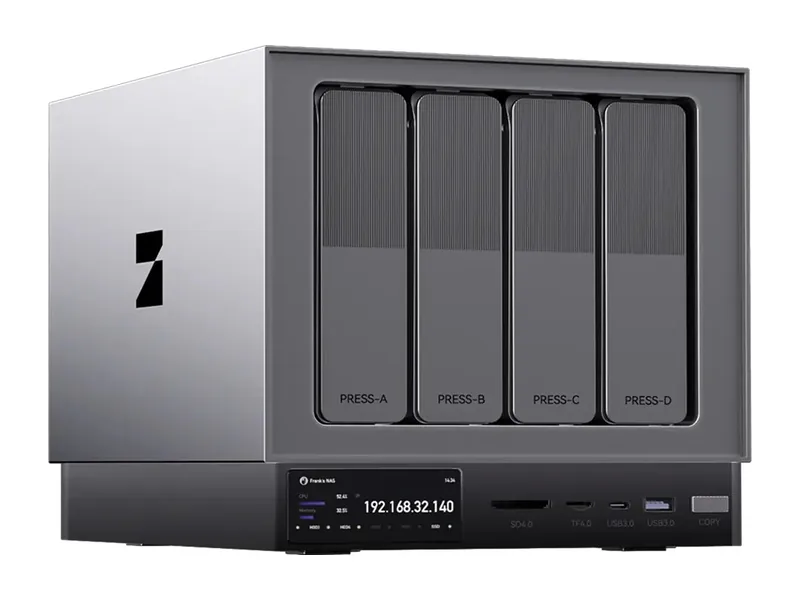
The D4 suits a buyer who wants a 4-bay desktop NAS with on-device AI features for photos, search and cameras, and who does not need to run large models. It has a Rockchip RK3588 with 8 cores and a 6 TOPS NPU, 16GB of LPDDR4x memory, one 2.5GbE port and one 1GbE port, and one M.2 slot. It runs ZettOS with Docker and VM support. Vendor-confirmed features include AI photo search, AI Search, AI transcription and a surveillance app for ONVIF and RTSP cameras. The AINAS Score is 29. Small models such as Qwen3 8B fit at Q4 (Estimated).
The memory is what rules the D4 out for some buyers. It has 16GB of LPDDR4x that cannot be expanded, and there is no PCIe slot, USB4 or OCuLink, so there is no GPU path either. Anyone who wants to run 24B to 32B models locally, build a private RAG setup or use Ollama as a main workload will hit that ceiling. Models such as Mistral Small 3 24B and Qwen3 32B do not fit at Q4 (Estimated). Look instead for a system with at least 32GB of memory, ideally expandable, plus a PCIe slot, OCuLink or Thunderbolt for a graphics card, and a documented Docker environment.
No verified price
We have not verified a listing for the Zettlab D4 at a retailer we track. The specifications below stand on their own; a price appears here as soon as a listing is confirmed.
Product prices and availability are accurate as of the date/time indicated and are subject to change. Any price and availability information displayed on Amazon.co.uk or Amazon.com, as applicable, at the time of purchase will apply to the purchase of this product.
Each capability shows how it was confirmed: Verified by AINAS, Vendor confirmed, Community confirmed or Unverified.
| Capability | Supported | Evidence | Note |
|---|---|---|---|
| Local LLM | Limited | Vendor confirmed | Compare table lists AI Q&A (via PC Computing Power) for D4; Local LLM listed only for Ultra models |
| Ollama | Limited | Unverified | No Ollama app or guide found; ARM Docker with 16GB fixed RAM |
| Open WebUI | Limited | Unverified | No Open WebUI source found; plausible via Docker |
| RAG | Limited | Vendor confirmed | AI Q&A over NAS files, but generation relies on a PC |
| AI search | Yes | Vendor confirmed | AI Search listed in compare table for D4 |
| GPU expansion | No | Vendor confirmed | No PCIe expansion, no USB4, no OCuLink |
| Hardware acceleration | Yes | Vendor confirmed | H.264 and H.265 8/10-bit codecs listed; 4K HDMI output |
| AI photos | Yes | Vendor confirmed | AI Categories and AI photo search via 6 TOPS NPU |
| AI video | Yes | Vendor confirmed | AI Transcription listed in compare table |
| Surveillance AI | Yes | Vendor confirmed | Surveillance Management app for ONVIF/RTSP IP cameras (ZettOS, not model specific) |
Calculated from the D4's memory and each model's published size at each quantization. Rows marked Estimated are calculations, not benchmarks. Check any model.
| Model | Best quantization | Runs? | Memory needed | Expected performance | Verification |
|---|---|---|---|---|---|
| Llama 3.2 3BLlama, 3.21B | Q8 | Yes | 13GB | Not measured | Estimated |
| Llama 3.1 8BLlama, 8.03B | Q5 | Yes | 15GB | Not measured | Estimated |
| Qwen3 8BQwen, 8.19B | Q4 | Yes | 15GB | Not measured | Estimated |
| Gemma 3 12BGemma, 11.8B | Q4 | Marginal | 15GB | Not measured | Estimated |
| Qwen3 14BQwen, 14.8B | Q4 | Marginal | 16GB | Not measured | Estimated |
| Phi-4 14BPhi, 14.7B | Q4 | Marginal | 16GB | Not measured | Estimated |
| Mistral Small 3 24BMistral, 23.6B | None fits | No | 25GB at Q4 | Not measured | Estimated |
| Gemma 3 27BGemma, 27B | None fits | No | 29GB at Q4 | Not measured | Estimated |
| Qwen3 30B A3BQwen, 30.5B | None fits | No | 31GB at Q4 | Not measured | Estimated |
| Qwen3 32BQwen, 32.8B | None fits | No | 32GB at Q4 | Not measured | Estimated |
| DeepSeek-R1 32B (Qwen distill)DeepSeek, 32.8B | None fits | No | 32GB at Q4 | Not measured | Estimated |
| Llama 3.3 70BLlama, 70.6B | None fits | No | 60GB at Q4 | Not measured | Estimated |
| Llama 4 Scout 17Bx16ELlama, 109B | None fits | No | 89GB at Q4 | Not measured | Estimated |
| Qwen2.5 72BQwen, 72.7B | None fits | No | 65GB at Q4 | Not measured | Estimated |
| Mistral Large 2 123BMistral, 123B | None fits | No | 96GB at Q4 | Not measured | Estimated |
One verdict per workload, from the D4's use-case scores and capability rows. Unknown means we cannot confirm it, not that it probably works.
The D4 is a poor choice for running a local LLM. Vendor-confirmed AI Q&A relies on a PC for computing power, Ollama is unverified, and the fixed 16GB of memory limits model size.
Private RAG is a poor fit on the D4. The vendor confirms AI Q&A over NAS files, but generation relies on a PC, and Open WebUI and Ollama support are both unverified.
AI search is rated poor for the D4, despite a feature being present. The vendor lists AI Search for it and confirms support, but the 16GB memory and lack of a GPU path keep the overall rating low.
AI photos is rated poor overall for the D4. The vendor confirms AI Categories and AI photo search running on the 6 TOPS NPU, but the rating reflects the system's limited memory and no GPU path.
Surveillance is rated poor for the D4. ZettOS includes a vendor-confirmed Surveillance Management app for ONVIF and RTSP IP cameras, but that is not specific to this model and the hardware is modest.
Home lab use is rated poor for the D4. It runs Docker and VMs, but the vendor notes VMs may affect performance, and memory is fixed at 16GB with no PCIe slot.
Business use is rated poor for the D4. It has no ECC memory listed, fixed 16GB of memory, and a top network speed of 2.5GbE, though it carries a two-year warranty.
Creative AI is rated poor for the D4. The vendor confirms no PCIe expansion, USB4 or OCuLink, so no graphics card can be added, though H.264 and H.265 codecs are listed.
The D4 ships with 16GB of LPDDR4x that cannot be upgraded, so the configuration you buy is the one you keep. For local AI that matters more than anything else on the spec sheet: model size is capped by memory, not storage.
As a rule of thumb, a 4-bit model needs about 0.6GB per billion parameters plus room for context. After leaving around 8GB for the NAS operating system, 16GB leaves space for a model of roughly 13B parameters at most (Estimated).
No. The D4 has no PCIe slot or OCuLink port for a graphics card. Inference runs on the CPU, so keep to small models.
The 6 TOPS NPU helps with photo recognition, transcription and vendor AI features. Most open-source runtimes such as Ollama do not use NAS NPUs yet, so do not count it towards language model speed.
With limits. The D4 can host a small RAG stack such as AnythingLLM or Open WebUI with a compact embedding model, but memory and compute restrict how large the answering model can be. It suits a personal document library more than a team knowledge base.
The manufacturer also provides AI search across your files (documented by the manufacturer), which covers simple document questions without setting up your own stack.
Networking is 2.5GbE + 1GbE. Fine for one or two users; indexing a large archive over the network will be slower.
| Configuration | RAM | SSD | Notes |
|---|---|---|---|
| 16GB | 16GB | None | Single configuration, diskless, SKU NAS-D4. |
The closest Zettlab model by bay count and AINAS Score. Only the specifications that differ are listed.
The D4 scores best for Business (31/100) and Home Lab (30/100). It suits small offices that need shared storage with private AI tools and room to grow.
It is a weaker fit for anyone who wants to run models larger than about 8B parameters and for buyers who expect to add a graphics card later.
Other AI Capable systems closest in overall score.
Yes, Qwen3 8B is the largest listed model that fits at Q4 on the D4 (Estimated). It needs 5.2GB at Q4, against 16GB of memory. At Q8 it needs 8.9GB and is marginal (Estimated). Gemma 3 12B is marginal at Q4 (Estimated) and does not fit at Q8 (Estimated). This is a calculation, not a benchmark.
No. The D4 has 16GB of LPDDR4x included and a maximum of 16GB, so it cannot be expanded. Choose the memory you need before buying. The model has no ECC memory listed, so error correction is not confirmed either.
No. The vendor confirms no PCIe expansion, no USB4 and no OCuLink on the D4. It has no PCIe slot and no Thunderbolt ports, so there is no route to attach an external or internal graphics card.
Yes, one. The D4 has a single M.2 SSD slot, alongside 4 SATA drive bays. The PCIe generation of the slot is not published. The system drive is a separate 32GB eMMC.
Yes. The D4 supports Docker on ZettOS, using an 8-core Arm processor with 16GB of fixed memory. Virtual machines are also supported, though the vendor says running VMs may affect performance. Ollama and Open WebUI are unverified.
Yes. The Rockchip RK3588 in the D4 includes a 6 TOPS NPU, and Zettlab uses it for AI Categories and AI photo search, which are vendor confirmed. AI Search and AI Transcription are also listed for the D4. Language models are a different matter: AI Q&A runs on PC computing power rather than on the NAS, and the fixed 16GB of LPDDR4x keeps 12B to 14B models marginal at Q4 (Estimated).
Partly. Ollama support is not yet verified. See the capability table above for the source.
Partly. Open WebUI support is not yet verified. See the capability table above for the source.
Yes. AI photos support is documented by the manufacturer. See the capability table above for the source.
Yes. Surveillance AI support is documented by the manufacturer. See the capability table above for the source.
Yes. Hardware acceleration support is documented by the manufacturer. See the capability table above for the source.
It has 2.5GbE + 1GbE built in. The fastest port is 2.5GbE.
Every field records its source. Specifications were last checked on . Spot an error? Send a correction with a manufacturer link.